Eyenotate App
Description
This app is meant to infer the models built by the ACE Ophthalmology Team and other teams that are trained to segment the different retinal layers of OCT Volumes. The app allows you to quickly visualize the segmentation results of different apps in an interactive interfrace, and also download the individual OCT frames with their masks. This app is built with the intention of continuing to add more models to the app as they are developed of the ACE Ophthalmology Team and other teams that we decide to add or if they decide to add their own models.
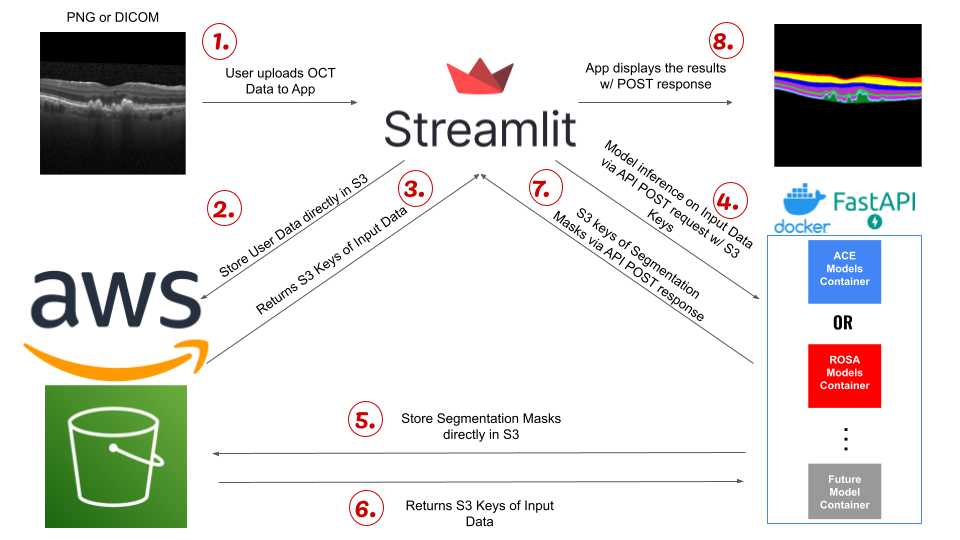
High-Level Design
Team Responsible
The team responsible for maintaining and troubleshooting the application.
Main Point of Contact:
- Adam Villard
- Email: pely.adam@gene.com
- unix-id:
pelya
- Data Engineering Team
- Slack:
#ecdi-ace-data-engineering
- Slack:
GitHub
The repository for the application can be found at GitHub Link.
Deployment Information
It has two environments, one for staging and one for production; details are as follows:
| Staging | Production | |
|---|---|---|
| git branch | dev | main |
| Deployment environment | ace-test (EKS) Namespace: eyenotate-staging | ace-test (EKS) Namespace: eyenotate |
| Deployment tool | https://argocd.eks.test.gred.ai/applications/argocd/eyenotate-staging | https://argocd.eks.test.gred.ai/applications/argocd/eyenotate-prod |
| URL | - http://eyenotate.test.staging.gred.ai/ - Accessible only via VPN - Authentication via Okta | - http://eyenotate.test.gred.ai/ - Accessible only via VPN - Authentication via Okta |
| S3 Bucket | - gred-ace-application-eyenotate-staging - Application connects to s3 via eyenotate-app-write-app-eyenotate-staging s3 access point | - gred-ace-application-eyenotate - Application connects to s3 via eyenotate-app-write-app-eyenotate s3 access point |
| Service Account | - serviceAccount Name: eyenotate-staging - irsa role: arn:aws:iam::712649426017:role/irsa.ace-test.eyenotate.eyenotate-staging | - serviceAccount Name: eyenotate-prod - irsa role: arn:aws:iam::712649426017:role/irsa.ace-test.eyenotate.eyenotate-prod |
The Terraform workspace for the infrastructure can be found at Terraform Workspace Link.
How does the application get access to its s3 bucket ?
EKS Service account -> IRSA IAM Role -> The role has the tag id:app -> IAM Policy ace-eks-app-s3-access
Branching Flow
This represents the branching of the Eyenotate repository.
Main (If it has a tag, it will reconcile production)___
\                                                    /
 \_ Dev (Staging)___________________________________/
	                   \            /
                        \_feat ____/
How does Main Branch get versions?
If there is a ‘fix’, ‘feat’, or ‘hotfix’ present in the git commit, the GitHub action release will bump up the version. So it’s automatically.
How does helm Chart get new versions?
You should manually update the helm verion in Chart.yaml.
Monitoring
-
Monitoring Dashboard: Grafana
-
Metrics being monitored: Memory usage by pod, CPU usage by pod, Replica Availability, PV Capacity
-
Alerts and notifications:
- PersistentVolumeUsage Alert (the alert destination is
#ecdi-ace-infra-support)
- PersistentVolumeUsage Alert (the alert destination is
-
-
Logging Dashboard: Logs are available on the same Grafana Dashboard.
- To search logs in more details, please log in to OpenSearch > EKS ACE Test - Applications Dashboard > then choose namespace
eyenotate
- To search logs in more details, please log in to OpenSearch > EKS ACE Test - Applications Dashboard > then choose namespace