Business Function
Talend (Vendor product) is the enterprise solution for all data integration projects within Roche.
Enterprise Cloud Data Integration (ECDI) team manages the Talend platform at Roche.
Genentech Clinical Operations Reporting (gCORE) is an Operation Data Warehouse used by Genentech Research and Early Development (gRED). gCORE uses Talend as data integration tool
Talend has two components.
I. Cloud Infrastructure (Administration of users, roles, projects and license etc)
II. Local Environment (Remote Engine, Talend Studio)
Local Environment is managed by gRED - ACE Infra Team and the scope of this document is for Local Environment.
There are four talend environments:
- dev
- qa
- uat
- prod
Talend Product Architecture
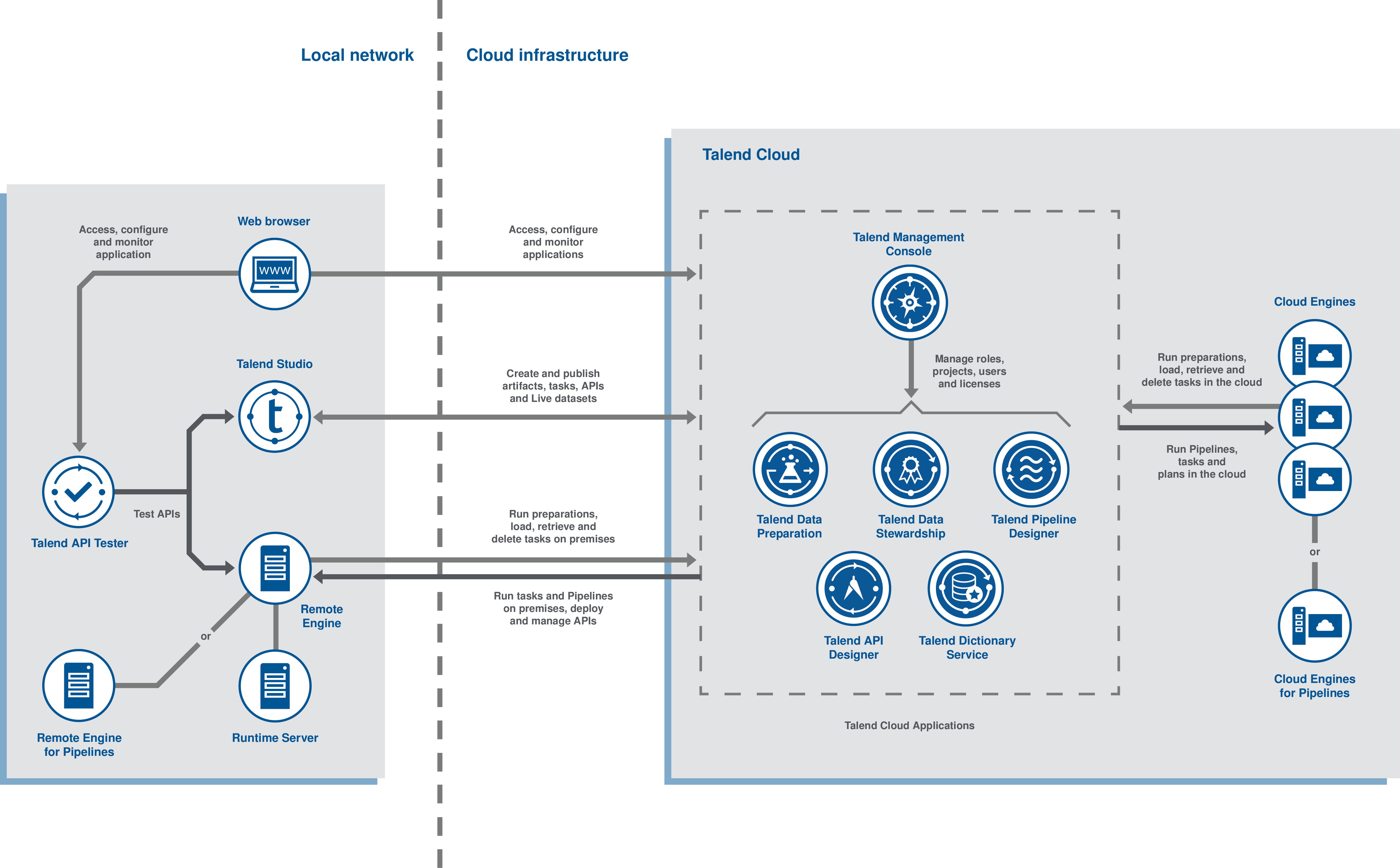
Reference: https://help.talend.com/r/en-US/Cloud/talend-cloud-getting-started/tic-architecture
Scope
The scope of this document is for prod running in the ACE AWS Account.
The regional scope of this Recovery Checklist is the us-west-2 region of AWS.
Out of Scope
- Multi-region availability is out of scope per business requirements.
Key Information
- Talend Remote Engine and Talend Runtime 64-bit Linux software is needed
- One time creation of Environment,Workspace, Engine, Key creation needs to be done by ECDI Team on Talend Server
Recovery Checklist & Dependencies
The following tables provide the step-by-step recovery checklist that the ACE Infra team can use to guide them through the recovery steps for the Talend Environment.
| Status | Task Summary | Task Details |
|---|---|---|
| complete | Talend Remote Engine Software download | Download software to your desktop Remote Engine - Nexus URL |
| complete | Talend Runtime Software download | Download software to your desktop Runtime - Nexus URL |
| complete | Talend software download problem | If you are unable to download the software reach out to gloecdi_opsteam@msxdl.roche.com |
| complete | Type Unzip Software download | Unzip Talend Remote Engine and Talend Runtime software downloaded |
| complete | Talend software binary check | Above unzip step is to make sure software binary is downloading successfully. It will not be used for installation |
| complete | Talend software download problem from EC2 | Check Route 53 —> Resolver —> Rules [nexus-gtm-roche-com-rule-outbound & nexus-roche-com-rule-outbound] if talend download problem from EC2.More info is on https://github.com/gred-ecdi/terraform-ace-prod/blob/master/us-west-2/infra-route53-dns/main.tf |
| complete | Talend License Remote Engine creation request | Raise ticket to create remote enginge and provide the Remote Engine key by raising ticket http://dpt-support.roche.com |
| complete | Talend Key placement | Place the Talend key on https://github.com/gred-ecdi/terraform-ace-prod/blob/master/us-west-2/infra-talend-reprod/main.tf —> talend_key |
| complete | Terraform init | run terraform init |
| complete | Terraform plan | After successful run of terraform init, run terraform plan |
| complete | Terraform apply | After successful run of terraform plan, run terraform apply |
| complete | s3 bucket | Get the s3 bucket name prefix from Terraform, it will be something like infra-talend-reprod |
| complete | Log into AWS | Log into the AWS Console using this link |
| complete | Navigate to s3 | Navigate to s3 service and look for the bucket with s3 bucket name prefix which is captured above |
| complete | Check Talend installer log on s3 | Inside the s3 bucket look for a folder called stack-data, navigate inside that folder and then to the folder with EC2 instance name |
| complete | Validate Log file on s3 | Open all the logs files under the bucket listed on the step above and make sure there is no errors on it |
| complete | Validate through Talend Studio | If you have access to Talend Studio, logon to Talend studio and try running any sample job |
| complete | Add RE to Cluster | Raise ticket to talend team http://dpt-support.roche.com to add remote engines created above to the ACE_DE_PROD Cluster |
| Common issue & Fix | kms pull installation | Install kms pull manually; Logon to EC2; cd /talend_002/kmspull; ./install_kmspull_from_root -eetl_admin_prod infra-talend-reprod-1.gred.ai; chmod 755 /usr/local/bin/kmspull; Repeate this steps on all the servers |
Troubleshooting Steps: I. Key update and Restart Remote Engine
-
Stop the engine: systemctl stop talend-remote-engine.service
-
Replace license key cd /opt/Talend/etc Open preauthorized.key.cfg file for editing and update remote.engine.pre.authorized.key parameter with the new key Save the file
-
Directory Cleanup rm -rf /opt/Talend/data/* Open /opt/Talend/etc/org.talend.ipaas.rt.pairing.agent.cfg file and remove value for remote.engine.id parameter. Save the file.
-
Start the engine systemctl start talend-remote-engine.service
-
Check Status systemctl status talend-remote-engine.service
II. ECD Talend Team Contact
- Reach out to grzegorz.bielak@contractors.roche.com or lukasz.limanowski@roche.com via chat. They work on Central European Timezone
- Or Raise a ticket to ECD Talend team via http://dpt-support.roche.com
III. Talend Error Fix
- If Terraform Talend has any problem it is easier to get new key and spin up a new instance. It is much easier