Purpose
The purpose of this document is to outline the ACE’s AWS Budgets design and implementation plan. Our aim is to provide a clear and cohesive guide to managing and controlling our AWS expenditures, ensuring alignment with the organization’s financial goals and strategies. By sharing our approach, we seek to foster collaboration, efficiency, and adherence to budgetary constraints within our projects.
Budgets vs. Cost Explorer
AWS Budgets allows us to set custom budgets that alert stakeholders when costs or usage exceed (or are forecasted to exceed) set thresholds. It’s more about setting and managing financial constraints, giving us a proactive approach to controlling our AWS spend.
AWS Cost Explorer is more of a tool to visualize and understand our AWS costs and usage over time. It helps us analyze our spending patterns and identifies areas for potential savings.
So in short, while AWS Budgets is about setting limits and getting notified, Cost Explorer is about analyzing and understanding where our money’s going.
Prerequisites
AWS Budgets are pretty simple to implement, but there success depends on the following important prerequisites.
Mandatory Tag Keys
The immediate goal for AWS Budgets within ACE is to manage Team costs, with plans to later track budgets at the Function or Project level. Thankfully, these units are each linked to a corresponding AWS tag key:
- Function
- Team
- Project
Enforcement of these tag keys is managed through HashiCorp Sentinel, but this alone doesn’t ensure budget accuracy. Enforced standardization and security of tag values are equally crucial, and that’s where IAM comes into play. Implementing IAM policies will complete the puzzle, providing the necessary control over the tag values.
Accurate Tag Values
As of August 2023, this is greatest impediment to the success of both AWS Budgets & AWS Cost Explorer. We’ve enforced requisite tag keys for several years now, but that’s only half the battle. In order for this model to succeed we need to ensure the consistency and accuracy of the tag values. The table below provides some helpful examples:
| Focus Area | Antipatterns |
|---|---|
| Tag value consistency | Given three members of our AI Respiratory Team: One user tags their Team as air, another as AIR and yet another as ai-respiratory. This makes reporting on per-team spend a cumbersome and error prone endeavor. |
| Tag value accuracy | Given a member of our AI Respiratory Team: The user tags their Team as ai-neurology. This results in inaccurate per-team budgets. |
Budget Types
| Budget Type | Description |
|---|---|
| USAGE | Monitors the quantity of specific AWS products used, alerting if utilization exceeds set thresholds. |
| COST | Tracks actual expenses incurred for AWS services, allowing alerts if spending goes beyond the defined budget. |
| RI_UTILIZATION | Tracks how much of reserved capacity (e.g., EC2 instances) is utilized, ensuring no overspending on unused reservations. |
| RI_COVERAGE | Checks that usage is covered by Reserved Instances, helping to determine if you have enough reservations without overcommitting. |
| SAVINGS_PLANS_UTILIZATION | Focuses on the utilization of Savings Plans, ensuring full use of subscribed Savings Plans. |
| SAVINGS_PLANS_COVERAGE | Monitors how much AWS usage is covered by Savings Plans, identifying areas to optimize for cost savings. |
Budget Configuration Nomenclature
The nomenclature for our AWS Budgets configurations is as follows:
{team-name}-{environment}-{budget-type}-{service scope}
| ID | Description |
|---|---|
| Team Name | The name of the team, as defined our Team tag |
| Environment | The environment (e.g prod, test, sandbox) |
| Budget Type | The type of budget. See the Budget Types section for values & definitions |
| Service Scope | Identify the scope of the budget. For example, ec2 if just EC2 related costs or all if all services |
Budget Configurations
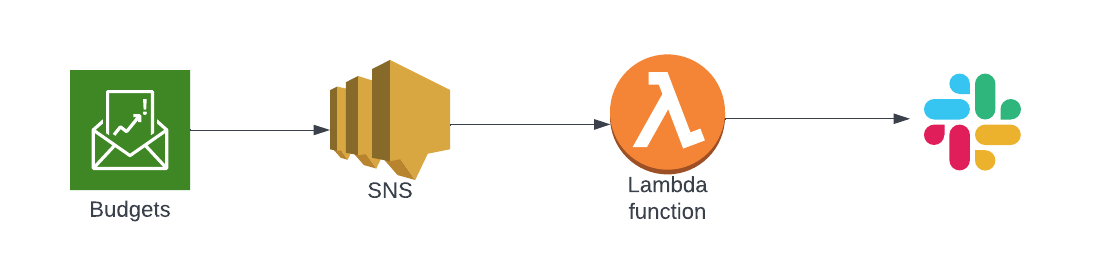
gcs-compcat-compchem-sandbox-cost-all
| Account | gred-ace-sandbox |
| Budget | gcs-compcat-compchem-sandbox-cost-all |
| Workspace | gcs-catalyst-compchem-budgets-sandbox |
| Code | gcs-catalyst-compchem-budgets |
| Purpose | Team required access to Sandbox environment where everyone gets Admin rights. Saima approved access as long as we could implement cost controls. We do so using AWS Budgets + IAM constraints to enforce the tagging regimen required for AWS Budgets to work. |
| Foundation Ticket | Grant ACE AWS Sandbox access to gRED GCS Computational Catalyst CompChem Team #1067 |
Outstanding Issues
This section calls out limiting issues that require resolution, either directly or via compensating controls.
No IAM Enforcement for S3 Bucket Creation
s3:CreateBucket fails (unauthorized) when included in our IAM tag_enforcement policy #1125
No IAM Enforcement for Lambda Creation
lambda:CreateFunction fails (unauthorized) when included in our IAM tag_enforcement policy #1124
Legacy Content
Everything below was written up by Ravali (former employee). Keeping until I have time to review and assess.
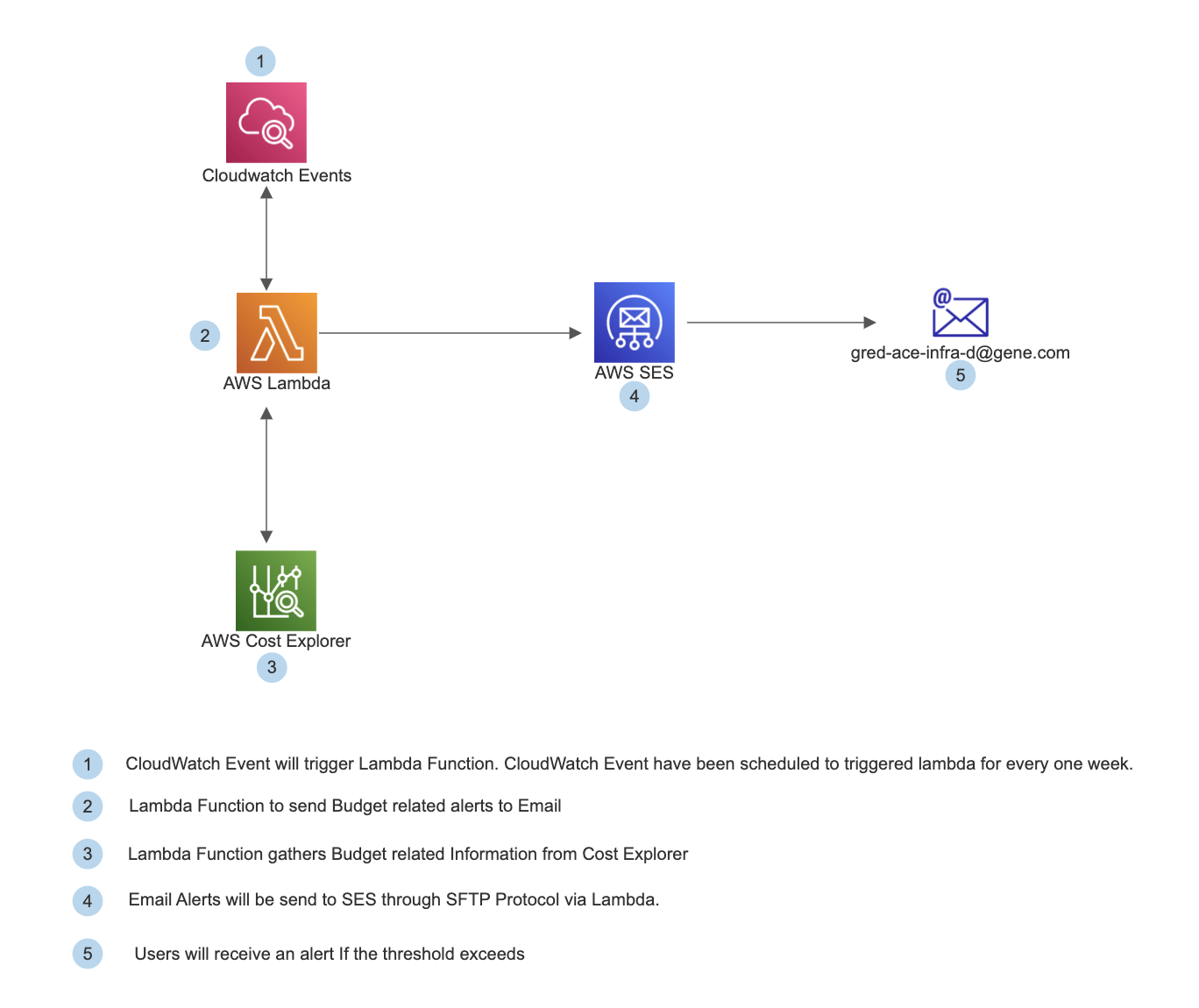
Budgeting Alert for whole AWS Account (gred-ace-prod) - Technical Architecture
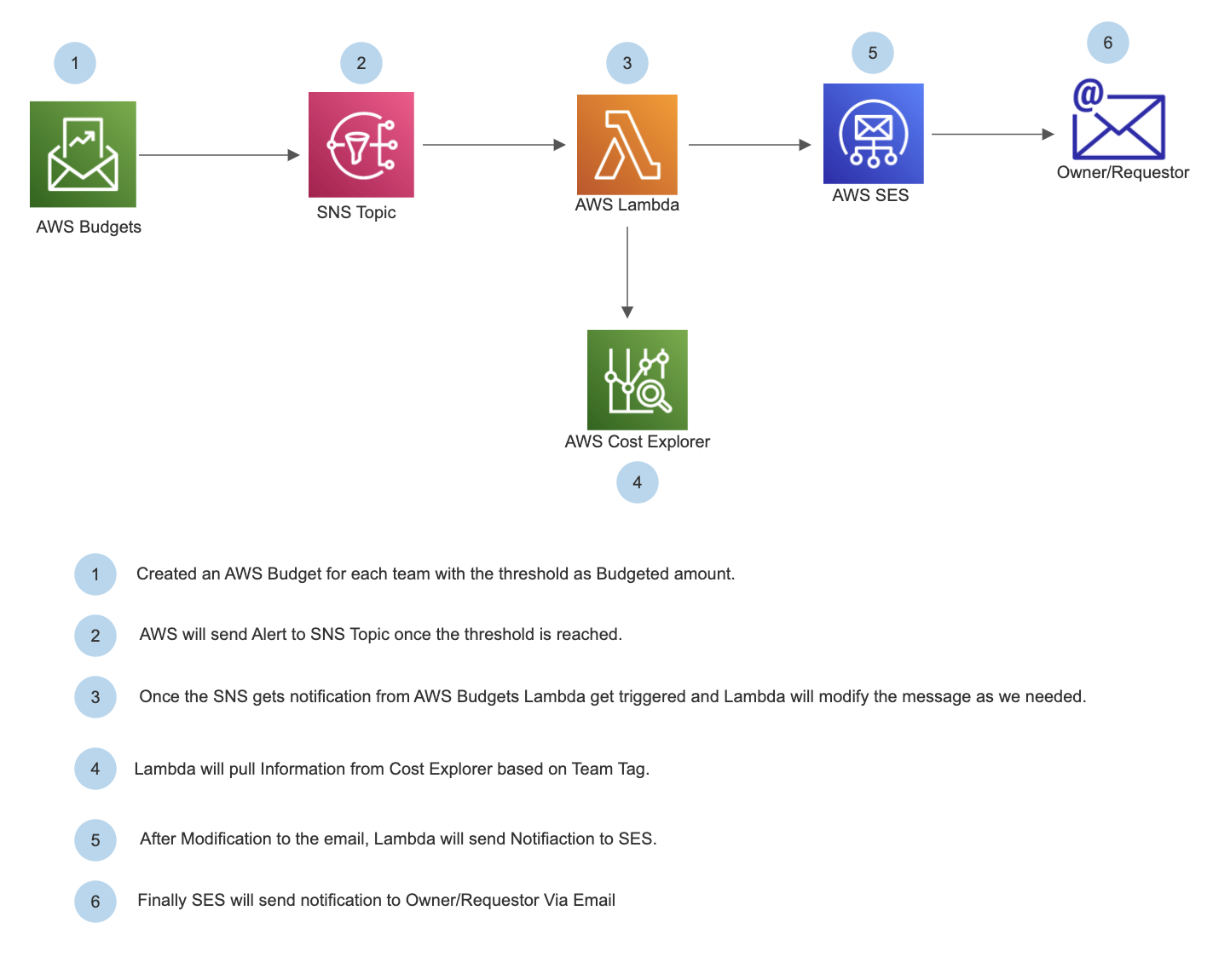
Budgeting Alert for ACE Team - Architecture
Terraform Code
https://app.terraform.io/app/gene-gred-ace/workspaces/awsbudgets-pushnotifications-deteam-prod-usw2