Amazon Managed Workflows for Apache Airflow (MWAA) is a managed orchestration service for Apache Airflow that makes it easier to setup and operate end-to-end data pipelines in the cloud at scale
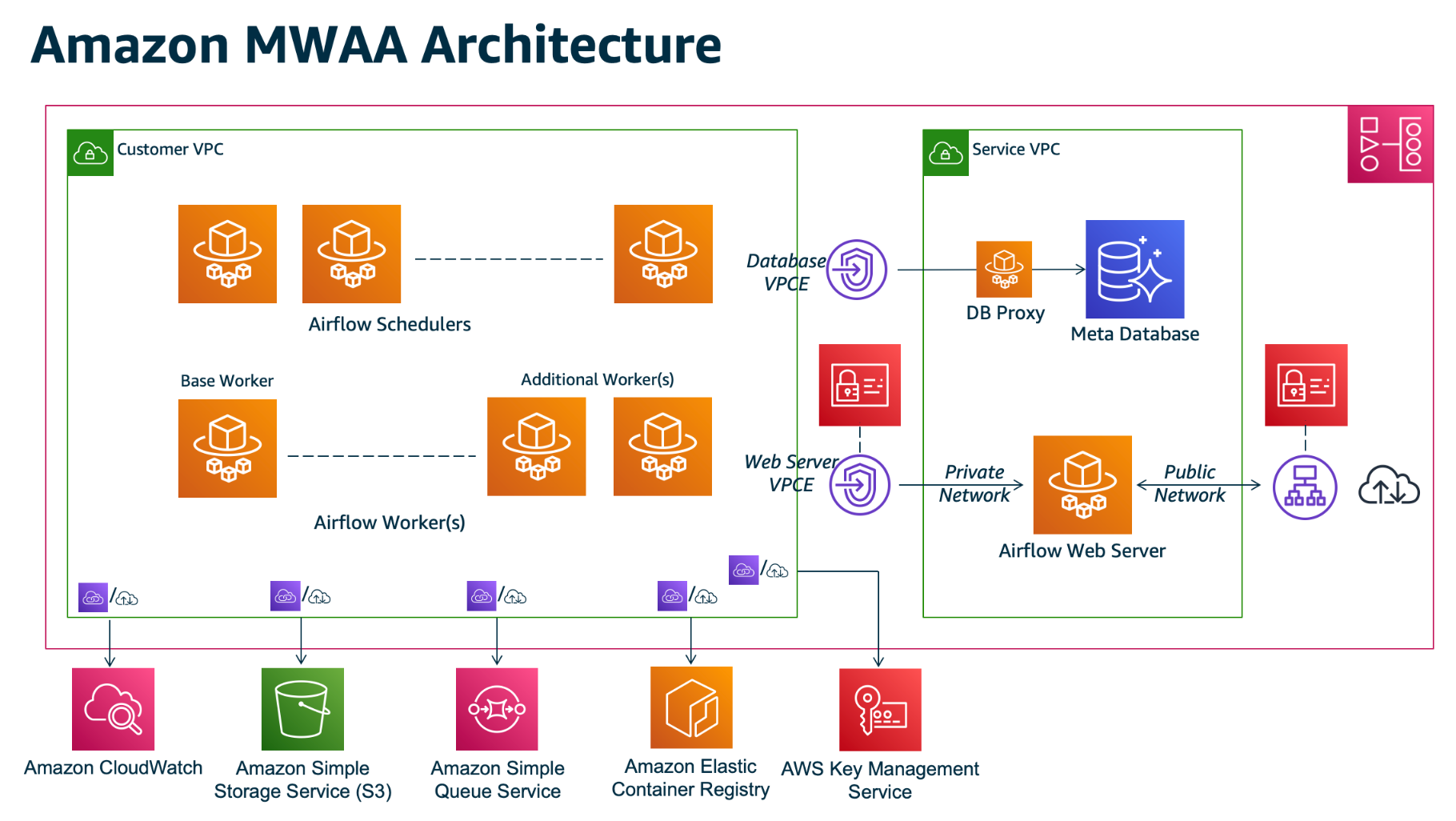
Reference: https://docs.aws.amazon.com/mwaa/latest/userguide/what-is-mwaa.html
IMO Airflow Setup:
Listed below are the components on Customer VPC which makes the IMO Airflow Terraform code.
- VPC - ace-svcs
- Subnets - Private Subnets
- KMS Key - New KMS key with Encrypt/Decrypt for Log Service
- s3 Bucket - To place DAG and requirements File
- MWAA Policies - List of policies needed for Airflow
- Assume role - sts assume role for airflow
- MWAA Execution role - Create role with MWAA Policies and Assume Role
- Airflow SG group - Airflow security group with self reference
- Airflow Environment - Airflow env using above execution role, KMS key, S3 bucket and web server with Private Access
- sns topic - place holder topic for sns notification in future
- User Policies - List of policies needed for users to access/update airflow, s3 bucket, read cloudwatch, IMO secrets
- User group - Create group and attach user policy. [This will be deleted after transition to SSO]
- Policy Role attach - Attach User policies to IMO SSO Role
Note: ECR, SQS listed on above archiecture on Customer VPC is not used by IMO Airflow.
IMO Execution Role:
IMO Airflow execution role is based on below Airflow documentation. https://docs.aws.amazon.com/mwaa/latest/userguide/mwaa-create-role.html. Section: Sample policy for a customer managed key
IMO Airflow Access Method:
- IMO Airflow webserver is private so it is not accessible via internet
- Roche DC IP should be on SG with port 443 to access Airflow Private Web server. It does not need VPC End point as listed on Architecture.
- User can access webserver by connecting to Roche VPN
- Service VPC - Managed by AWS. Connection from Customer VPC to Service VPC is made via VPC Endpoint which is created automatically by Airflow during setup. No need to work on any additional steps for configuration
IMO Airflow self serve capability:
- Self server refers to the activities which can be performed by IMO team with minimal intervention from ECDI ACE Infra Team
- IMO team can perform update to Python requirements, DAGS, plugins and other airflow executables through mwaa console.
- IMO team can create connection, manage schedule, DAGS on airflow web server console
- IMO team can increase/decrease scheduler count, changes environment class
- IMO team has the capability to change web server access to PUBLIC. Ideally they should not do it, but there is no way to restrict it without restricting all the other capability listed above.
IMO Airflow Points to Remember:
- Airflow uses SQS (in-built) not created by users. It makes reference to Airflow Execution Role.
- Execution role should not be deleted otherwise reference to SQS will be lost. It is a suggestion from AWS.
- If any changes needs to be done on Execution role, it should only be updated and should not be deleted/recreated.
IMO Airflow Troubleshooting Steps:
- Clone the repository https://github.com/awslabs/aws-support-tools/tree/master/MWAA
- Logon to AWS via command line
- Run command similar to the one below and check the output to see if there is any error.
python3 aws-support-tools/MWAA/verify_env/verify_env.py —envname imo-airflow-dev —profile ace-infra-prod