This page covers DDC’s approach to Disaster Recovery Plan (DRP) and Resilience Concept (RC) and identifies the critical systems that are covered by the DRP. In addition, links to the recovery checklist for each critical system can be found below under Critical Systems.
Definitions
A Disaster Recovery Plan (DRP) is a predefined procedure describing how an IT Service or Component has to respond to (some of) the disaster scenarios identified in the Business Continuity Plan of the responsible Organization. The DRP contains detailed instructions to quickly resume the operation of the IT Service fully or at a minimum level that allows the consumers to use its key functionality.
A Resilience Concept (RC) describes the security mechanisms implemented in the IT Service or Component to ensure a continuous delivery (or a minimal disruption) of the service to other IT applications or components relying on it in the case of a continuity event.
Differently from a Disaster Recovery Plan, a Resilience Concept relies on the built-in redundancy and automatic controls. Therefore, no manual action is required to restore the service, although manual intervention may be necessary after the event triggering the safeguards to bring the system to a situation where it can be challenged again.
A Test Plan is an indispensable part of the preparation against disasters and every DRP or RC must be accompanied by a Test Plan describing the testing scope and procedure. If Disaster Recovery Plans or Resilience Plans are not tested, there’s a real chance the plan will fail to execute as expected when they are really needed.
Recovery Point Capability (RPC) is the point in time to which data was restored and/or systems were recovered (at the designated recovery/alternate location) after an outage or during a disaster recovery exercise.
Recovery Time Capability (RTC) is the demonstrated amount of time in which systems, applications and/or functions have been recovered, during an exercise or actual event , at the designated recovery /alternate location (physical or virtual).
Out of Scope
The DDC system interacts with other system and applications. These are:
- Medidata Rave
- Teradata
This disaster recovery plan explains the sequential order in which these systems have to be recovered, but it is not in scope how to recover these systems. This has to be documented in separate plans. Following the business requirement, disaster recovery will be implemented in the DDC production with the support of Staging/Test environment. Due to the countless possibilities of scenarios, it is almost impossible to foresee how to recover or rebuild the Development and Test environments. It strongly depends on the impact of a disaster, the degree of destruction, the HW lifecycle or depreciation. Therefore the recovery of all non-production DDC components is out of scope A dual datacenter disaster (where both Basel CoLo and Kaiseraugst locations are unavailable) and the recovery from this situation is not in scope of this plan.
DDC Landscape
System Overview
The scope of the DDC application centers around the transfer of data from the EMR system to Medidata RAVE. The DDC application is responsible for extracting and receiving the EMR data from a predefined HTTP based endpoint (or FTP location), processing that data into predefined CRF configurations and then transferring that data to RAVE. Along with pure data transfer, the DDC application provides the ability for users to create Unscheduled Local Lab events, initiate log (or repeat entry CRF’s) and initiate visits that don’t have a visit date already entered. These convenience capabilities are meant as an aid to assist the user in an otherwise manual operation in RAVE and streamlines the data transfer process. The DDC application is not meant to provide data entry capabilities and besides these convenience capabilities does not provide any data entry functionality. The following diagram shows the basic architecture of the system. DDC will be used to automatically transfer data to RAVE. DDC can be used in lieu of the current EDC data entry process. DDC provides automatic transfer of data instead of manual data entry. DDC compliments the current EDC data entry process, it does not replace the current data transfer mechanism.
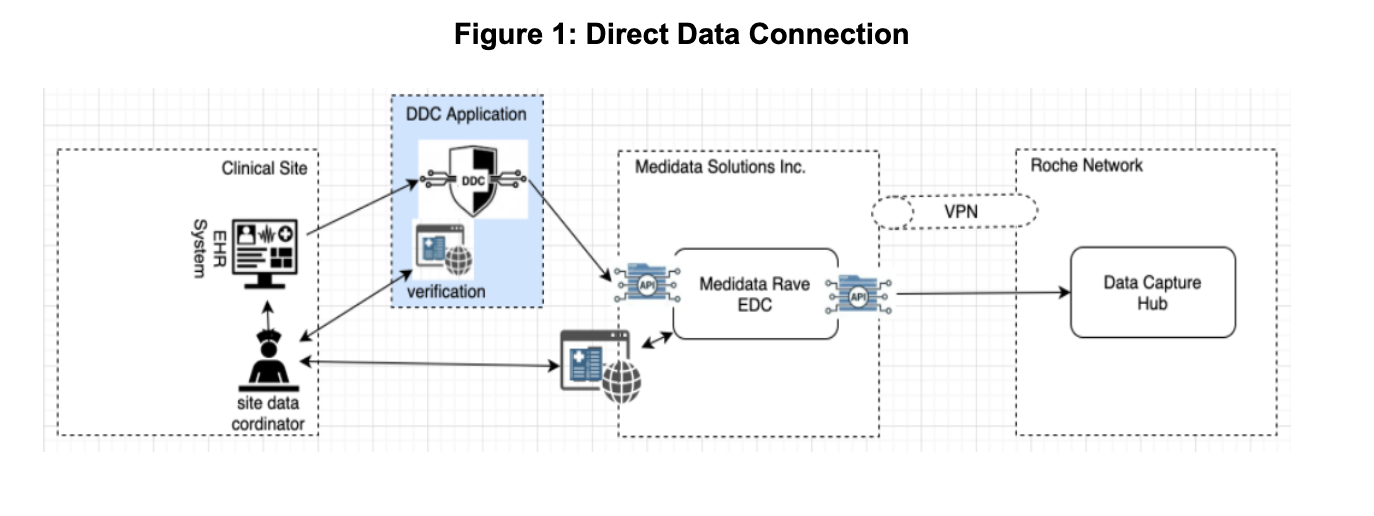
DDC Components
DDC has three main components to the overall solution:
- Data Import - This component of the application will import data from the sites and support mapping of the data to a standard data model and load the data into the staging area for mapping.
- Data Verification – This component of the application provides a web based user interface that allows users to view the mapped data from the Clinical Data Systems at the sites and associated the data with a visit and CRF in the EDC.
- Data Integration to EDC – This component of the application sends the data to EDC after it has been verified. This is the most complex component of the solution as it needs to accommodate several EDC study configurations. This complexity is addressed by site and study specific configurations which map the incoming site clinical data to EDC visits and CRFs. The EDC provides a common set of APIs that are used to transfer the data.
Critical Systems
Critical systems are broken down into three categories. The link below for each critical system will provide details of the recovery checklist.
- Amazon RDS is responsible for hosting the software components and infrastructure of DB instances and DB clusters. You are responsible for query tuning, which is the process of adjusting SQL queries to improve performance
- In other cases, the DDC Infra team is responsible for deploying an application and its required components to a VPC in our AWS account. The
VPC-Deployed Applicationssubsection below covers this category. - The final category are infrastructure services that are provided. This section is covered below by the
Infrastructuresubsection.
VPC-Deployed Applications
| VPC Deployed Application | Owner |
|---|---|
| [lambda functions] | DDC |
Infrastructure
| Infrastructure Resource | Owner |
|---|---|
| AWS RDS | DDC Infra |
*This service is not productionalized yet. We are going through a POC. When the POC is done and this is productionalized, it will be considered a critical system.
Recovery Capabilities
| Capability | Hours |
|---|---|
| Recovery Time Capability | 24 Hours |
| Recovery Point Capability | 24 Hours |
Disaster Scenarios
This Disaster Recovery Plan mitigates against the following scenarios listed as Yes Below.
| Disaster Scenario | Protects Yes/No |
|---|---|
| Pandemic | Yes |
| Loss of Availability Zone in AWS | Yes |
| Loss of Region in AWS | Partial |
Note that S3 buckets do not need backups by default as AWS provides a 99.999999999% (11 9s) data durability percentage. The only case where backups are needed are for multi-region support. Since we default to a single region, S3 data is not backed up.