nGene - What is it?
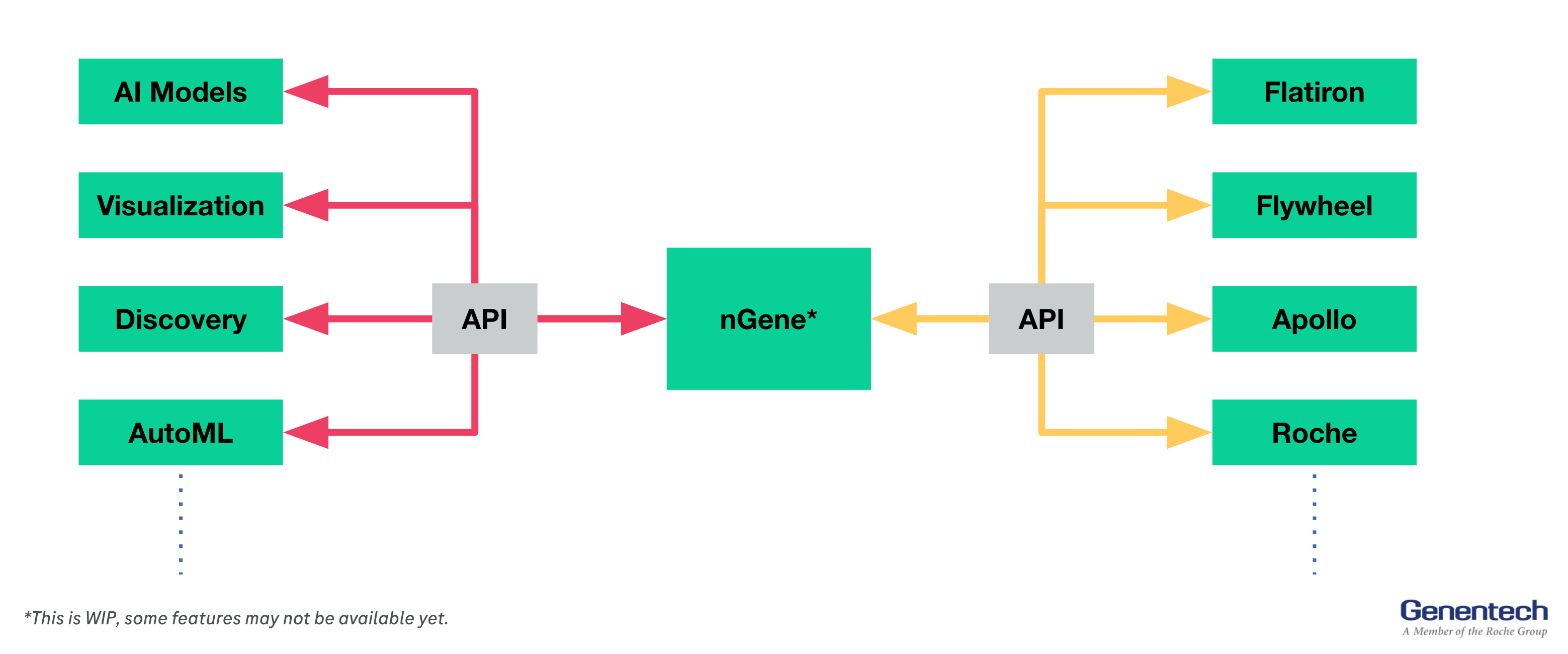
nGene is a clinical data platform that integrates internal and external clinical data from all modalities, and studies, and provides access to them in a unified interface to users.
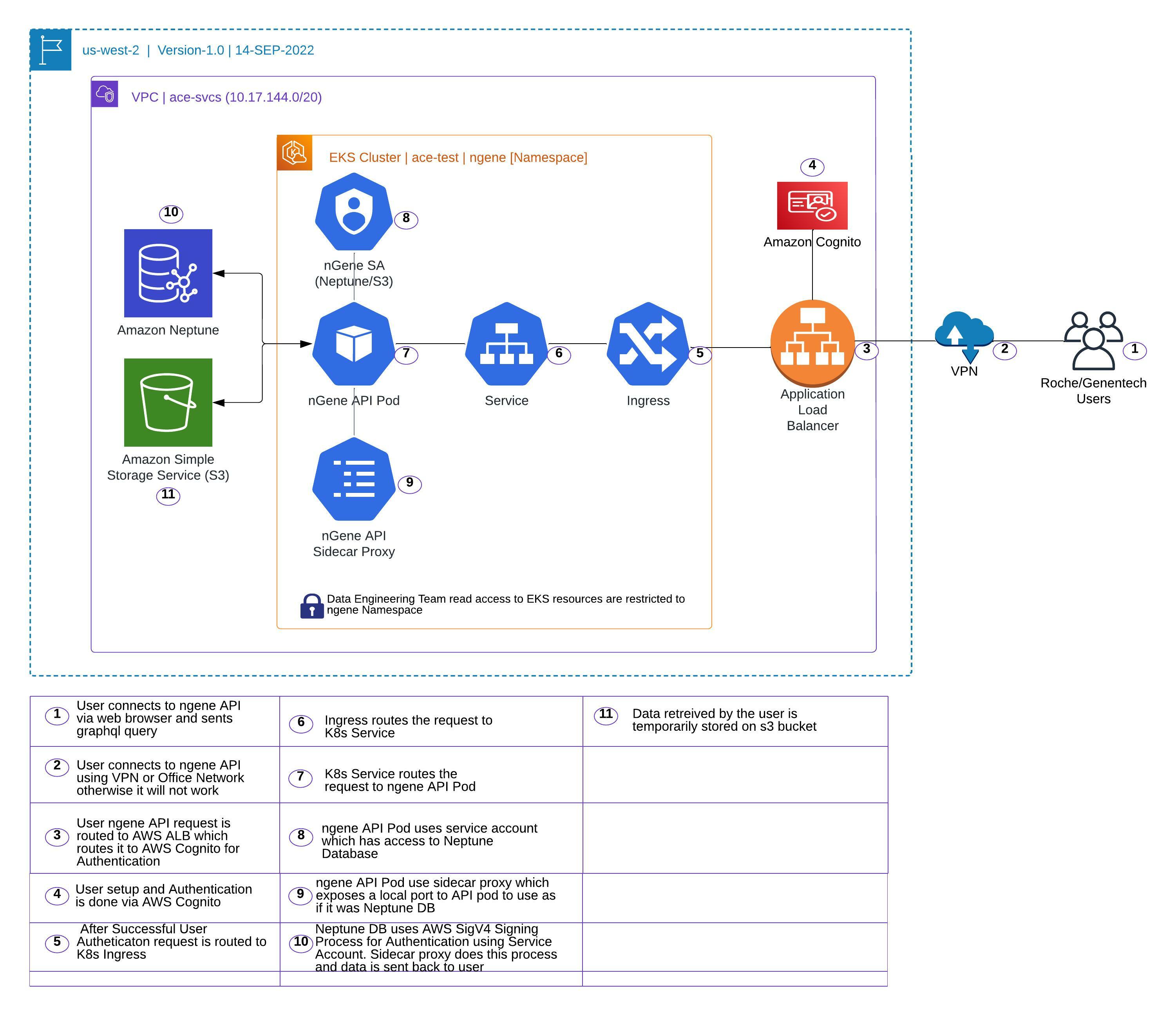
nGene API - Technical Architecture
nGene - Code Base
-
Infrastructure code will be owned by ACE-Infra Team.
Infrastructure component includes K8s namespace, role, role-binding, user addition to role, ECR access policy, EKS Cluster access, Cognito user pool, Cognito user pool access
Terraform files: https://github.com/gred-ecdi/terraform-ace-prod/tree/master/us-west-2/infra-ngene-api-test-usw2
-
K8s component will be owned by Data Engineering Team.
K8s components includes ACM Certificate, route 53 dns, EKS role for Neptune access, helm chart, K8s deployment, ingress, service, service account, configmap, hpa
Terraform files: https://github.com/gred-ecdi/ace-de-data-platform/tree/feat/deployment/infra/deployment/test
nGene - CI/CD
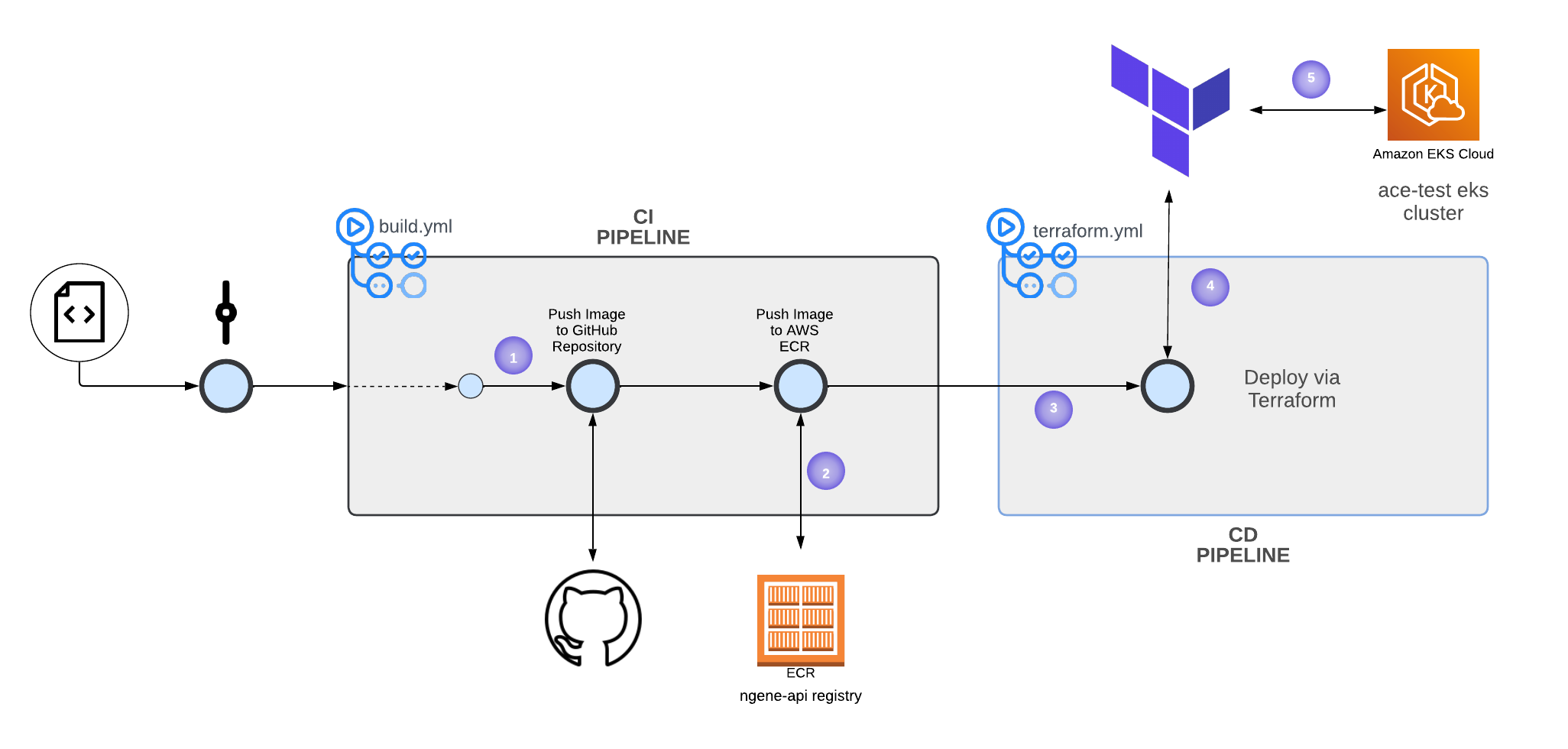
In order to increase deployment speed, we provide a CI/CD pipeline - Lucid Chart
-
Any changes to the code base via
push_requeston thedevelopbranch will trigger the creation of a Docker image. This will push the image to the GitHub repository and ECR. -
For pushing Docker images to ECR, we use
Self-hosted runners. Self-hosted runners have full access to all repositories on ECR, based on this policy. When the self-hosted GitHub runner authenticates itself to AWS, it can push/pull from the registry. -
K8s components of the app are controlled via IaC - Terraform. If a new Docker image is created
ORany changes are made to Terraform files, the terraform workflow will be triggered. -
On TF Cloud, a team called
dehas been created for data engineering. We added the team access API key to the repository’s Github secret -TF_API_TOKEN. This way the runner authenticates itself to the TF cloud. -
Finally, the TF Cloud Agent will do
terraform init,terraform validate,terraform plan,andterraform applyon eksace-test.
nGene - API User Access Management
User Authentication is managed manually via AWS Cognito. Authorization is not requested by nGene Team
SSO Login —> https://wam.roche.com/idp/startSSO.ping?PartnerSpId=urn:amazon:webservices_ACEPROD.
Cognito Userpool —> https://us-west-2.console.aws.amazon.com/cognito/users/?region=us-west-2#/pool/us-west-2_SJHnUP2Hr/details?_k=ou0lb8
Authentication and Authorization via Enterprise Single SignOn (Ping Federate) or KeyCloak is being considered
nGene - Data Engineering Namespace Access
Data Engineering Team has access to ngene namespace to look into ingress, pod, service logs.
Since SSO hasn’t been enabled for the Data Engineering team, access is provisioned by adding Data Engineering team members onto aws-auth config map on kube-system namespace.
Refer code below
https://github.com/gred-ecdi/terraform-ace-prod/blob/master/global/iam-user-mgmt/main.tf
nGene API & Neptune Connectivity: AWS SigV4 signer sidecar
In order to use IAM authentication for Neptune, the application needs to be configured to use AWS SigV4 Signing Process to properly authenticate to NeptuneDB. This is handled automatically by AWS SDK if the application is using it.
For nGene, the developers need to be able to use Neptune and non-Neptune GraphDBs synonymously—that is, they don’t want to use AWS SDK but rather use standard Python/Gremlin drivers. We use aws4-proxy sidecar to acheive this.
aws4-proxy is a small sidecar proxy service that runs alongside the application and exposes a local port to the application to use as if it was NeptuneDB. All requests are intercepted and subsequently signed and sent to the real NeptuneDB endpoint with proper authentication.
Currently, the sidecar is configured as follows (another container inside the pod)
- name: aws-sigv4-sidecar
  image: "{{ .Values.sidecar.image.repository }}:{{ .Values.sidecar.image.tag }}"
  imagePullPolicy: {{ .Values.sidecar.image.pullPolicy }}
  args:
  - --service=neptune-db
  - --region=us-west-2
  - --endpoint=ngene-api-test-cluster.cluster-ro-c7cfiskz6bjy.us-west-2.neptune.amazonaws.com
  - --endpoint-port=8182
  - --port=8080
  ports:
  - name: http
    containerPort: 8080
    protocol: TCP
This exposes http://localhost:8080 as if it was the NeptuneDB endpoint to the application. IAM credentias are automatically picked up from the IAM role assigned to the pod (IRSA)