What is Wiz
Wiz is a Cloud Security Platform that supports all the popular Cloud Service Providers (CSPs); we utilize it as our primary security tool across our Amazon Web Services (AWS) accounts, Azure Accounts and Github Repositories.
Why did we move to Wiz? In the past, we were reliant on GuardDuty, SecurityHub, and several other AWS tools. However, due to their limited customizability and the numerous false alerts they produced, we made the decision to migrate to Wiz.
Quick Start
Access
On Okta dashboard, Click on Wiz Cloud Security Platform
Currently, this is accessible only to Ace Infra admins and DDC Infra admins. However, we have plans to open it up to other teams in our to-do list.
Code
- Terraform Workspace: terraform-ace-prod/global/wiz-cloud-security
- Kubernetes connector Helm charts:
Architecture
An Overview of What Wiz Does
We use Wiz for the following security activities:
- Cloud Security Posture Management (CSPM)
- Vulnerability Management
- Kubernetes Security Posture Management
- Cloud Workload Protection
- Infrastructure-as-Code (IaC) scanning
- Code Security
- Cloud Infrastructure Entitlement Management
- Data Security Posture Management
Here is the scan data flow that Wiz follows to analyze the Cloud:
- Cloud Scanner: A scan begins with the Cloud Scanner. The AWS Backend assumes a read-only IAM Role (
WizAccess-Role) to gain access to CSP API calls. This enables the fetching of resource metadata such as VM names, properties, and volume IDs. - Workload Scanner: Snapshots or disk clones of VM volumes are created, scanned, and then deleted. This is achieved by taking snapshots from the workloads of the account via assuming a role (
WizScannerRole-*) and scanning inside the Kubernetes cluster located in the WizOutpost in the same region. - Workload scan JSON: Metadata extracted from scanned volumes results are sent to Wiz backend in JSON format.
- Assessment: Wiz performs assessments and prioritizes them based on their risks.
- Results: The final results are displayed.
AWS WizOutpost Deployment Model
Wiz proposes two types of deployment models:
- SaaS (which is referred to as ‘agentless’)
- Wiz Outpost
We are utilizing the Wiz Outpost deployment model. It enables us to perform all workload scanning (Step 2) in our own environment using our infrastructure.
With the Outpost deployment model, all functionalities of the Workload Scanner are removed from the Wiz backend and recreated within our environment. The process of creating, scanning, and deleting snapshots/disk clones remains the same, but all the analysis occurs within our environment. Only the results — metadata including installed packages, exposed secrets, malware, etc. — are sent to the Wiz backend.
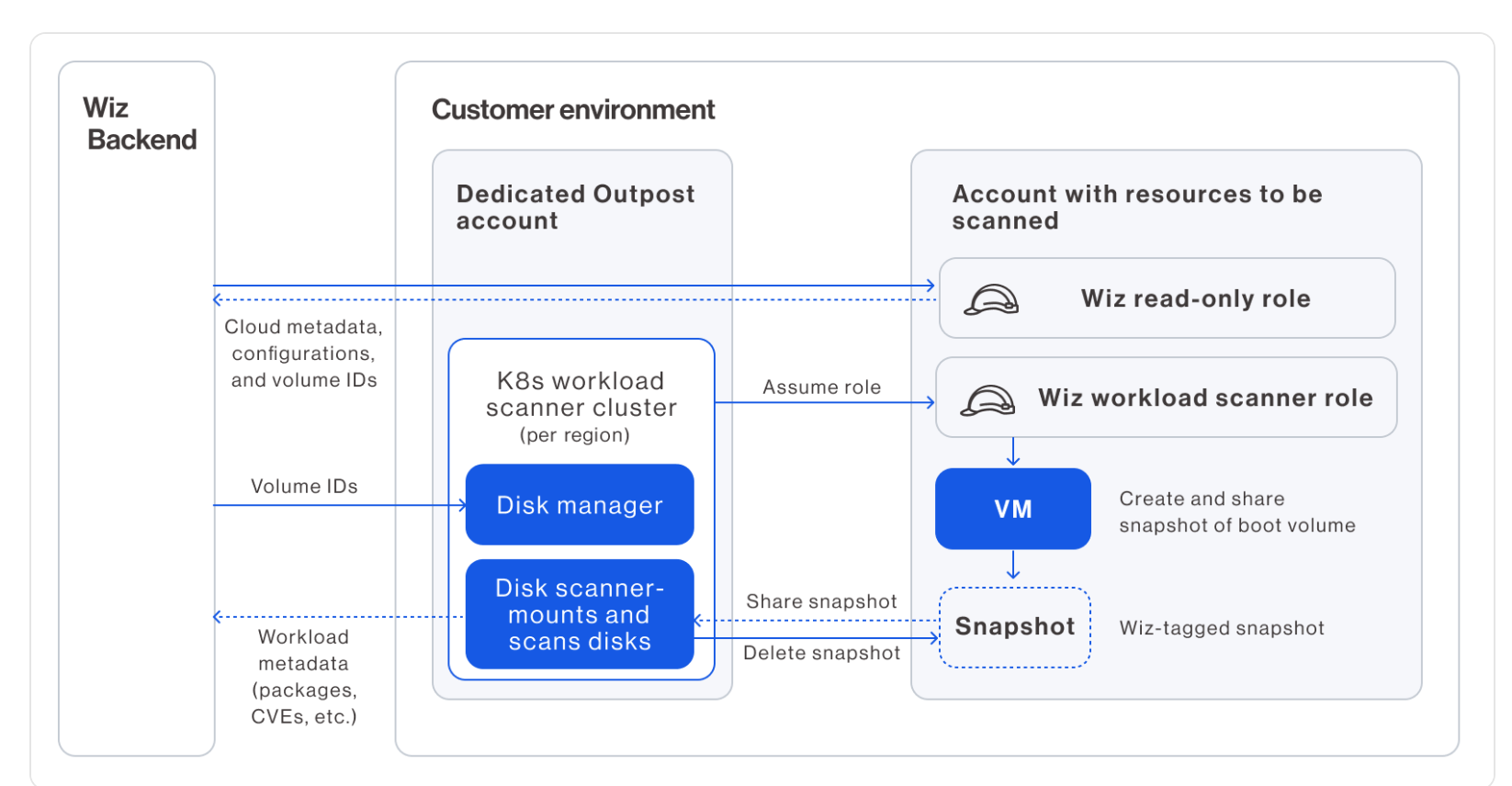
An Outpost comprises the following major components:
- Wiz Orchestrator Role (
WizOrchestratorRole): Used by the Wiz backend to provision the cluster and all other resources required for the Outpost (SQS, VPC, subnet, etc.). - Wiz Orchestrator EKS Role(
WizOrchestratorEKSRole): A standard role in the dedicated Outpost account that allows the Orchestrator (from the Wiz backend) to write volume IDs to the queue and manage the Kubernetes cluster (scale-out, scale-in, instantiate in new regions, etc.). - Queue: A list of the volume IDs to be scanned by the Kubernetes cluster.
- Wiz Orchestrator Node Pool Role (
WizOrchestratorNodePoolRole): Used by the EKS cluster nodes for essential actions related to the snapshot scanning process (attaching/detaching volumes, creating volumes, etc.). The pods in the cluster run with this role. It is also used to read the scan messages from the SQS queue and sync secrets to the cluster. Also used to perform data scanning and provide DSPM capabilities,
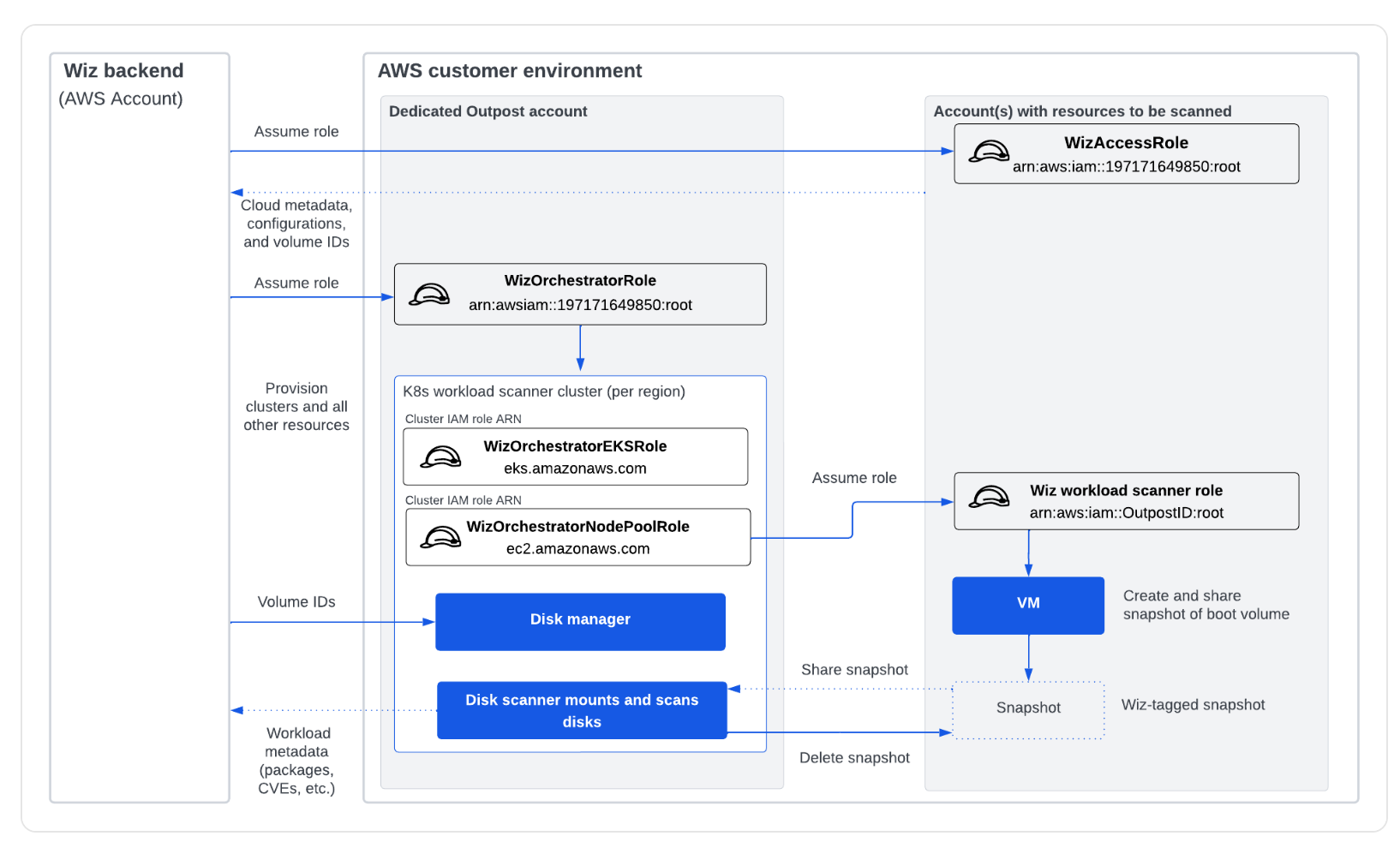
The Kubernetes clusters must reside in the same region as the VMs they scan in order to use disk cloning or snapshot sharing when mounting volumes to be scanned. Wiz has permissions to spin up EKS clusters, as needed, to ensure workloads across all regions are scanned. Transferring snapshots from one region to another for scanning workloads across different regions would be prohibitively slow and costly! You can view the list of active Outpost EKS clusters in various regions here.
AWS Outpost Account Details:
This dedicated account is used by Wiz to perform its scanning operations. Details of this account are provided in the table below:
| Account | Cloud Provider | Account ID | How to Access | Environment |
|---|---|---|---|---|
| AWS_ENT_B_gcsacewiz_3500271 | AWS | 355109186158 | This account is not configured with Okta. To login: Step 1: Please login via Prod Roche’s Federation Portal: https://awsportal.roche.com Step 2: Switch the role to: Account: 355109186158 Role: GLOAWS_Cloud_Contributor | WizOutpost Dedicated Account |
Note: You need to be a member of the AD group
GLOAWSGCSACEWIZ_Contributorsto access this account. If you do not have access, please inform the ace-infra team.
- How was the Outpost deployed in the account?
We followed this guide: AWS Outpost Creation
You can view its CloudFormation stack in the account > region
eu-west-1> wiz-outpost stack.
Currently, we only have one WizOutpost named prod-wiz-outpost. We use cloud connectors and ECR connectors to link this to other accounts and ECRs.
Connectors
Wiz’s Connectors are agentless cloud-native scanners that utilize our CSP’s platform APIs to perform a comprehensive analysis of your environment across networks, identities, vulnerabilities, secrets, application endpoints, and more. We are using various connectors to link Wiz to different parts of our cloud and services. Here is the list:
1. Cloud Connectors: These allow the Wiz Backend and WizOutpost to access the cloud accounts by creating policies and IAM roles of WizAccess-Role and WizScannerRole-*. Currently, we have around 6 active AWS Cloud connectors on Wiz, including ace-prod, sandboxes, and DDC accounts.
2. ECR Connector:
This connector is used to scan images directly from the Amazon Elastic Container Registry (ECR).
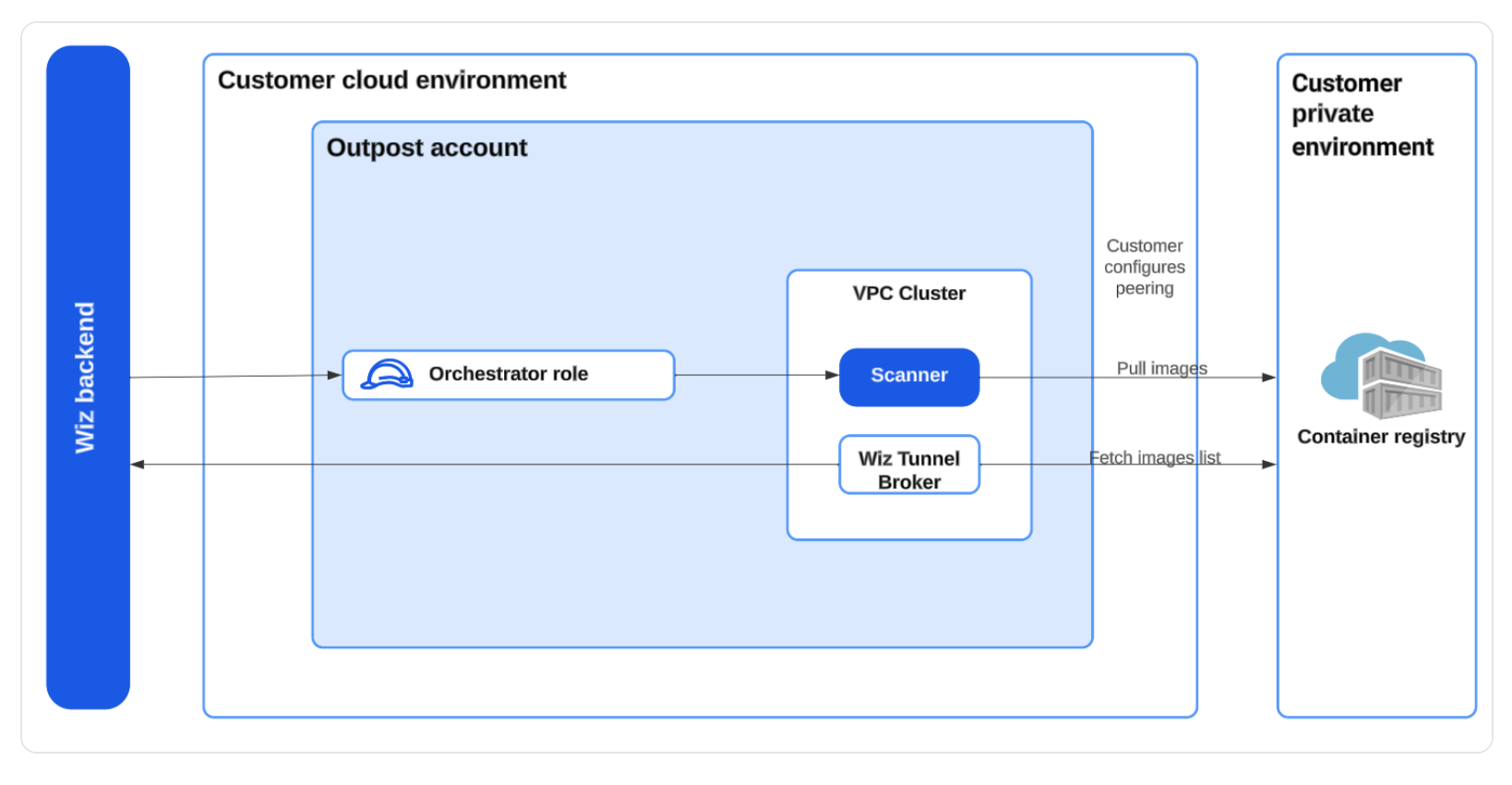
3. Kubernetes Connectors: These allow Wiz to assess Kubernetes clusters directly via the Kubernetes API, identifying risks associated with Kubernetes-specific identities, secrets, configurations, etc. We deploy them using a helm chart; their configurations can be referenced in the Quick start section. ArgoCD is used for deployment.
3.1 Wiz Admission Controllers:
The Wiz AC implements the Kubernetes dynamic admission control concept. It runs as a Deployment in our clusters, reviewing requests made to the cluster’s API server and enforcing policies to review or block each request.
Note: Currently, we are not actively managing or blocking on AC tasks. This is on our to-do list.
3.2: Runtime Sensors: The Runtime Sensor helps protect Kubernetes clusters by detecting potential threats in realtime.
4. Github Connector (Shiftleft) We have connected Wiz to our GitHub Org, giving Wiz access and enabling it to scan our code repositories. Wiz connects to our web-based GitHub server instance via a GitHub App. Its configuration can be viewed here.
Why are we not using wiz-cli? Adding wiz-cli to the GitHub action of each repository would be cumbersome. The GitHub Connector provides the same features with a single-point configuration, which aligns better with our approach. 5. AWS Cloud Events Connect Wiz to your cloud event logs to enable one or both of the following features:
- Cloud events & detections – These detect security events that may indicate an ongoing breach or violation of your organizational security policies. They can generate issues (if enabled) that can, in turn, trigger Automation Rules.
- Event-triggered scanning – This feature delivers near real-time visibility by scanning newly created resources, such as VMs or buckets, within minutes of instantiation. It updates their objects on the Security Graph and runs a full risk assessment on them.
Here is the Bucket Notification Architecture that we have deployed to configure the Cloud Events. Wiz integrates directly to the CloudTrail bucket and receives all object create events via the CloudTrail service to scan and read the events. 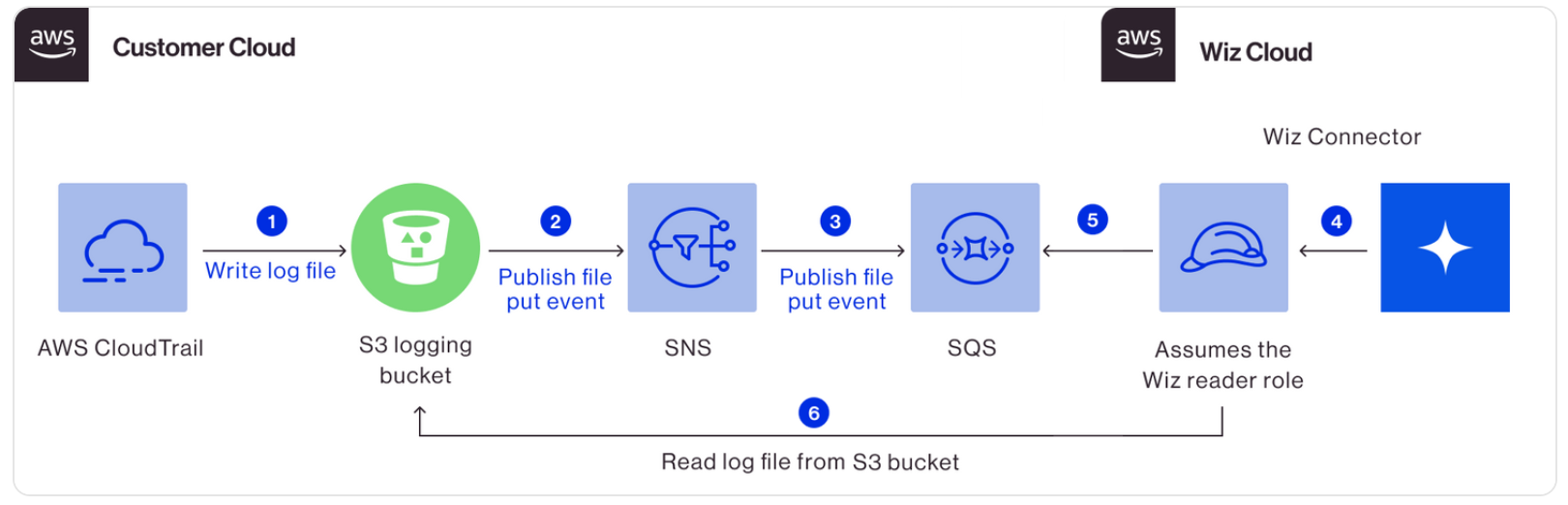
We have enabled this in our ace-prod account only. You can find the configuration in wiz-cloud-security workspace.
Maintenance
Alerting
Currently, we have several alerts active on ace-prod, which you can view under Automation Rules.
Since we are using Slack app it can send alerts to all channels. Destination can be specified when creating a new rule.
At present, we are channeling alerts to ecdi-ace-infra.
It’s part of our on-call chore to take care of new security alerts.
Shared Custody
At the time of writing this document, we have six cloud connectors across various ace-prod, sandbox, and DDC accounts. These accounts are held in shared custody.
| Cloud Connectors | Account ID | Responsible Team |
|---|---|---|
gred-ecdi-ace-prod | 712649426017 | ACE Infra |
gred-ecdi-ace-sandbox | 319647376096 | ACE Infra |
gred-ecdi-ace-rcp-sandbox | 639731594092 | ACE Infra |
aws-ddc-prod-wiz-connector | 550146336092 | DDC Infra (Henry) |
aws-ddc-dev-wiz-connector | 951412642259 | DDC Infra (Henry) |
aws-prod-wiz-connector | 355109186158 | ACE Infra/DDC Infra (Henry) |
Both DDC and ACE Infra maintain separate alerting channels, so we only need to focus on the accounts for which we hold responsibility.
When you log into the Wiz, you can select a specific project (a project is simply a folder that houses one or more cloud connectors) to view. Wiz then displays the dashboards and issues associated with that project. By default, when you log into Wiz, it displays dashboards for all projects.
Update IAM policies and CloudFormation
On several occasions, we have noticed system health issues in the cloud connectors and WizOutpost. As Wiz doesn’t currently have alerts configured for these, it’s necessary to periodically check the health status oaf the connectors and outpost for now. These issues most commonly concern the update of IAM policies and always come with remediation steps that you can easily follow.
The Wiz IAM Policies for gred-ace-prod have been configured by Terraform (Other AWS Connectors has been deployed by Cloudformation). In these instances, you only need to re-run the wiz-cloud-security workspace.
Reference Documentation
To access Wiz documentation, you must be logged into Wiz.
TODO
- Open up to other teams
- Configure Okta for AWS Outpost account
- Review Wiz Admission Controllers rules
- Define alerts for sandboxes
- Video of how to react to alerts